


What are the Pin-outs from PCMCIA PC Card to CompactFlash when using a CF Adapter?What are the Pin-outs from PCMCIA PC Card to CompactFlash when using a CF Adapter? j.mp/15ffDWf twitter.com/synchrotech_in…
— Synchrotech, Inc. (@synchrotech_inc) May 30, 2013
Showing posts with label PCMCIA. Show all posts
Showing posts with label PCMCIA. Show all posts
Thursday, 30 May 2013
Wednesday, 28 March 2012
MCE 3.21 was the final revision of the software, released in January of 2005.
Elan Digital Systems Ltd. was placed into liquidation in late 2011, and is no longer manufacturing any products or updating any software. This means, to all intents and purposes, MCE is an End Of Life product (discontinued).
We have some excellent alternatives, including a stand alone software package and portable PC Card readers with that software bundled. We strongly recommend all our customers consider those options since they are current and maintained products that run under modern versions of The Windows, whereas MCE's compatibility ended with the 32-bit version of Windows XP.
The product line we recommend is from CSM/IPI and you can view the whole range of their products, including USB 2.0 based PC Card Drive/software bundles on this page:
PCMCIA PC Card Manager Software for OMNIDrives and SoftDrive Professional
OmniDrive devices and their related software work with all modern Windows installations, including the 64-bit version of Windows 7. PC Card Manager and SoftDrive Professional offer all the same capabilities of MCE including the ability to erase, checksum, query, copy to and from, and create byte-for-byte binary images of PCMCIA PC Card memory devices.
All that said, there are still installations of Windows XP and older that will run MCE. In some cases, customers have a reason for running the software and or this demo version -- frequently to identify an unknown PC Card -- so we will carry MCE until our supplies are exhausted.
CAVEAT EMPTOR
MCE and MCE demo are End Of Life products with no upgrade path and no update potential. Moreover they are unsupported products. We will not provide any support on them at all and can't guarantee that the FAQs and support documents on Elan's website will be available in the long term. Install the demo or purchase MCE at your own risk. Again, we recommend all customers purchase the CSM/IPI products discussed above in lieu of MCE.
Because MCE is an End Of Life Product, Synchrotech is offering a massive 50% discount discount on the retail price.
Memory Card Explorer
Elan Digital Systems Ltd. was placed into liquidation in late 2011, and is no longer manufacturing any products or updating any software. This means, to all intents and purposes, MCE is an End Of Life product (discontinued).
We have some excellent alternatives, including a stand alone software package and portable PC Card readers with that software bundled. We strongly recommend all our customers consider those options since they are current and maintained products that run under modern versions of The Windows, whereas MCE's compatibility ended with the 32-bit version of Windows XP.
The product line we recommend is from CSM/IPI and you can view the whole range of their products, including USB 2.0 based PC Card Drive/software bundles on this page:
PCMCIA PC Card Manager Software for OMNIDrives and SoftDrive Professional
OmniDrive devices and their related software work with all modern Windows installations, including the 64-bit version of Windows 7. PC Card Manager and SoftDrive Professional offer all the same capabilities of MCE including the ability to erase, checksum, query, copy to and from, and create byte-for-byte binary images of PCMCIA PC Card memory devices.
All that said, there are still installations of Windows XP and older that will run MCE. In some cases, customers have a reason for running the software and or this demo version -- frequently to identify an unknown PC Card -- so we will carry MCE until our supplies are exhausted.
CAVEAT EMPTOR
MCE and MCE demo are End Of Life products with no upgrade path and no update potential. Moreover they are unsupported products. We will not provide any support on them at all and can't guarantee that the FAQs and support documents on Elan's website will be available in the long term. Install the demo or purchase MCE at your own risk. Again, we recommend all customers purchase the CSM/IPI products discussed above in lieu of MCE.
Because MCE is an End Of Life Product, Synchrotech is offering a massive 50% discount discount on the retail price.
Memory Card Explorer
Tuesday, 9 August 2011
These instructions are for attempting to correct an issue sometimes seen when using some 16-bit PC Cards on modern systems via the ExpressCard 34 to PCMCIA PC CardBus 16/32-bit Read-Writer Express2PCC
SYMPTOMS

The R2 (PCMCIA Release 2.x) PC Card does not start, and you see the following error message in Device Manager:
This device is either not present, not working properly, or does not have all the drivers installed. (Code 10)
Try upgrading the device drivers for this device.
CAUSE
This behavior occurs because some R2 PC Cards do not support interrupt request (IRQ) resource sharing. In The Windows XP or in Windows Vista, and perhaps Windows 7, 16-bit PC Card (PCMCIA) PCI readers can use R2 PC Cards (the 16-bit ISA type) without requiring an ISA runner paddle to obtain ISA interrupts.
RESOLUTION
All of the following procedures must by done under a user account with administrative permissions in order to work correctly.
To resolve this behavior, setting IRQ Route To PCI Controller to allow these PC Cards to function in laptop computers:
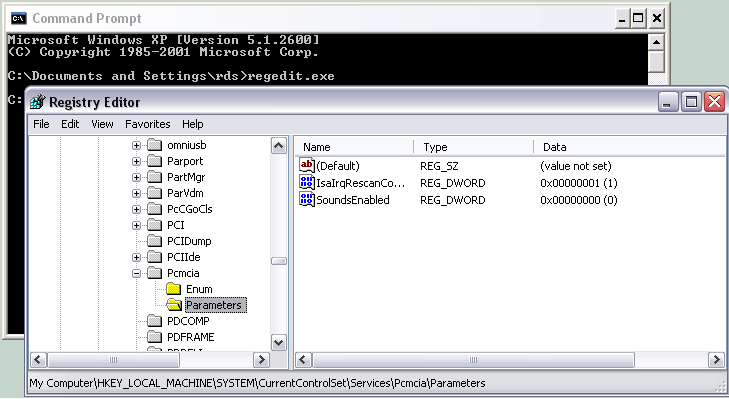
- Start Registry Editor (Regedit.exe).
- Locate and click to select the following key in the registry: HKEY_LOCAL_MACHINE\System\CurrentControlSet\Services\PCMCIA\Parameters
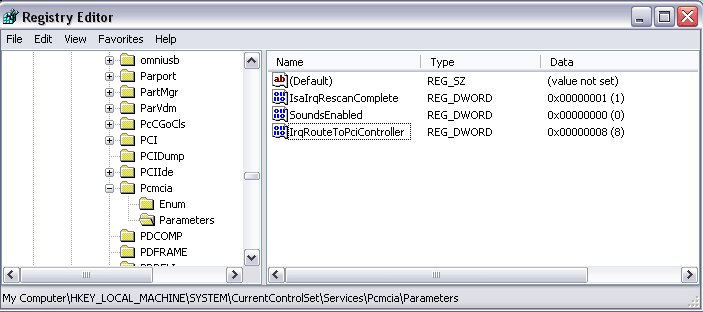
- On the Edit menu, click New, click DWORD Value, type IrqRouteToPciController in the New Value box, and then press ENTER.
- Click to select IrqRouteToPciController, click Edit, and then click Modify.
- In the Value data box, type 8, and then click OK.
- Quit Registry Editor.
Alternatively, download the IrqRouteToPciController.reg (IrqRouteToPciController.zip) file. First unzip and then double click to add the entry to the registry. Quit the Registry Editor when done.
Registry prior to editing.
Registry after editing.
This procedure disables PCI routing for 16-bit PC Cards.
With this feature, you can successfully install 16-bit PC Cards on computers that are low on ISA interrupts by using a shared-PCI interrupt.
Monday, 31 January 2011

15% off USB to PC Card Read-Writer 1 Slot PCMCIA PC Card ATA Flash and SRAM U111-M Using coupon code 1296512192 in our online shopping cart. Online only, cannot be combined with any other offer, expires 02/28/2011.
The Elan U111-M is an external read-writer for PCMCIA PC Card SRAM, and ATA Flash memory cards. The U111-M works without additional software or drivers on supported operating systems, treating both SRAM and ATA Flash as standard removable USB mass storage devices. Used in concert with a Type II PC Card adapter, the U111-M USB to PCMCIA Memory PC Card drive will work with a variety of consumer memory cards including CompactFlash and SD Cards.
The U111-M comes with a USB 'Y' for use on rare systems with underpowered ports. Simply plug in the additional power only connection in order to provide necessary current. The U111-M provides an inexpensive, hassle free solution to deploying legacy PCMCIA PC Card memory SRAM and ATA Flash cards on modern Windows and Linux computers with USB 1.1 or USB 2.0 ports.
For more information on using the U111-M on Linux, see U111-M testing results on Unix-like operating systems
Wednesday, 26 May 2010
Thursday, 5 November 2009
The Elan U111-M is an external read-writer for PCMCIA PC Card SRAM, and ATA Flash memory cards. The U111-M works without additional software or drivers on supported operating systems, treating both SRAM and ATA Flash as standard removable USB mass storage devices. Used in concert with a Type II PC Card adapter, the U111-M USB to PCMCIA Memory PC Card drive will work with a variety of consumer memory cards including CompactFlash and SD Cards.The U111-M comes with a USB 'Y' for use on rare systems with underpowered ports. Simply plug in the additional power only connection in order to provide necessary current. The U111-M provides an inexpensive, hassle free solution to deploying legacy PCMCIA PC Card memory SRAM and ATA Flash cards on modern Windows and Linux computers with USB 1.1 or USB 2.0 ports.
For more information on using the U111-M on Linux, see U111-M testing results on Unix-like operating systems
Monday, 27 July 2009
 CSM/IPI have released drivers and software compatible with 64-bit versions of the Windows. Allowing use of OMNIDriveUSB2 Pro and OMNIDriveUSB2 LF PC Card Readers with both 32/64 bit versions of The Windows XP, and The Windows Vista.
OMNIDriveUSB2 Pro allows the deployment of PCMCIA PC Card memory devices including ATA Flash and SRAM. OMNIDriveUSB2 LF allows the deployment of PCMCIA PC Card memory devices including ATA Flash, SRAM, and Linear Flash. With many current notebook computers being sold with no PC Card slots, and 64-bit versions of The Vista, this new will be welcome to many end users needing to access legacy hardware devices.
Be sure to read the Readme.htm file within the directory containing the rest of the files before proceeding with installation.
Wednesday, 12 November 2008
 This is in response to a question we saw on an archived Apple Discussion board": "Can I 'rescan' the PCI expansion slots?" Many of the answers you've been provided with here are incorrect. By specification, PCIe (PCI Express) is supposed to feature hot swap capability. This is why the ExpressCard standard features it for the higher end of the specification without modification. The has nothing to do with drivers or any of the other erroneous information put forth in this thread.
The inability of Mac OS X and Windows (Windows requires user intervention via their bizarre "device manager" interface) to hot swap PCIe based devices may stem from the fact that vendors didn't expect devices on the market which took advantage of PCIe's hot swap capability. Since Apple has implemented hot swap on the MacBook Pro's ExpressCard slot [1], there is no reason why they shouldn't be able to do the same with Macs featuring PCIe slots. At my day job, Synchrotech, we have to answer to people wanting to use Sony/Sandisk SxS cards on PowerMac G5 (PCIe) and Mac Pro systems almost every day. When we explain that a PCIe to ExpressCard reader currently requires a reboot between card swaps.
To put this in perspective MS argues that PCIe hot swap isn't possible, and that manually refreshing to rescan is the fault of BIOS/Firmware. Putting this theory to the test, we sent a PCIe to ExpressCard reader with several PCIe based ExpressCards to the OpenBSD team. Within three days the OpenBSD developers had implemented full hot swap PCIe in the kernel and we were able to hot swap PCIe based ExpressCards on a desktop PC with no issues.
The ability to add an inexpensive PCIe to ExpressCard reader to and PCIe based Macs and have them hot swap is crucial with the emergence of the Sony/Sandisk SxS cards and the professional cameras using them. Apple could easily become the premier platform for ingesting and processing these cards. We doubt it will be any more trouble for Apple to implement PCIe hot swap in the kernel than it was for the OpenBSD team.
[1] Important to remind people that ExpressCard is a dual bus standard. For slow and simple minded devices, ExpressCard employs USB 2.0. For high performance and complex applications ExpressCard utilizes PCIe. The ExpressCard standard effectively defines no new busses, it merely provides a different form factor and set of connectors for the existing PCIe and USB 2.0 standards.
Thursday, 2 October 2008
Friday, 15 August 2008

ExpressAdapt CardBus to ExpressCard
ExpressAdapt overcomes power considerations of earlier 32-bit PC CardBus adapters providing 1000mA at 3.3V and 650mA at 1.5V. With the ability to supply power on both ExpressCard rails, newer cards like the Option Wireless GT Max 3.6 Express are fully supported. Crafted with the highest quality connectors and frame materials, ExpressAdapt meets or exceeds the requirements of every standards body it falls under.
ExpressAdapt is a PCMCIA PC CardBus to USB ExpressCard Adapter. It works with USB 2.0 Mode ExpressCards only. This includes WWAN Wireless broadband cards like the Kyocera KPC680 and the Sierra Wireless AC597E. Like all PC Card to ExpressCard adapters, ExpressAdapt does NOT work with PCIe based ExpressCards. ExpressCards using the PCI Express (PCIe) portion of the ExpressCard standard include very high performance devices like FireWire 800 and eSATA host adapters.
Monday, 21 April 2008
Friday, 29 February 2008
Thursday, 21 February 2008
 The Elan P-Series card readers have switched CardBus controllers several times over the years. While they have used Texas Instruments and TI compatible controllers, the changes in specifics sometimes cause issues. While not completely chronologically accurate, the following rough timeline should be helpful. Elan P-Series devices prior to 2002 used the TI PCI-1420 for their two slot readers and either the TI PCI-1410 or PCI1211 (depending on availability at production) on their one slot readers. For a stretch of several years (roughly 2002-2006) Elan used ENE Technology Inc. CardBus controllers in place of TI. The CB1420 for two slot readers and the CB1410 for one slot readers. A reliable, and widely support TI PCI-14xx clone series, ENE's controllers actually fixed many of the errata from the chips they cloned. This, however, caused problems for systems coded around the problems with the original TI PCI-14xx series. Around the beginning of 2006 Elan switched back to TI PCI-1420 for their two slot readers and either the TI PCI-1410 on their one slot readers. However, there still is a lot of ENE based P-Series readers in inventory, and certain models of the P-Series will not be replaced with the TI based controllers until the existing stock of ENE devices are sold.
Tuesday, 23 October 2007
Wednesday, 17 October 2007
Wednesday, 3 October 2007
Monday, 24 September 2007
Wednesday, 5 September 2007
Celebrating digital photography in the month of September; Synchrotech has three very special offers on essential accessories for mobile photographers needing fast transfers to their notebook computers.
 For ExpressCard 34 and ExpressCard 54 equipped notebooks, our CFExpressPro ExpressCard to CompactFlash Memory Card Adapter is just $35 after a 17% discount. The CFExpressPro supports PIO though Mode 6 and UDMA through Mode 4 CompactFlash. This high performance device is perfect for photographers wanting to quickly download contents of their CompactFlash memory cards when on the road. The CFExpressPro has been a top seller with MacBook Pro users, and is a favorite item for many traveling photographers. This special price of $35 for the CFExpressPro expires 09/30/2007.
 Not forgetting photographers with notebooks from the PC Card slot era, Synchrotech is offering our PC CardBus Type II to CompactFlash Type II for just $26 after a 19% discount. Taking advantage of 32-bit CardBus PC Card slots, the ADP-CF2-PC32 handles PIO though Mode 6 and UDMA through Mode 4 CompactFlash cards like Sandisk's Extreme III line. This special price of $26 for the CFExpressPro expires 09/30/2007.
 Of course not all digital cameras use CompactFlash memory cards. For that reason we are also offering our ExpressCard 34 to Multiple Memory Card Adapter for just $35 after a 17% discount. The EXP34-ADP-MUL5-01 supports a whole range of modern memory cards including: SDHC (SD Card 2.0) and SD Card, xD Picture Cards (including Type M and H), MultiMediaCard and MultiMediaCard+ 4.0, Memory Stick and Memory Stick Pro. This high performance device allows mobile users to quickly download photos off their memory cards to their ExpressCard equipped notebook when traveling. This special price of $35 for the EXP34-ADP-MUL5-01 expires 09/30/2007.
For ExpressCard 34 and ExpressCard 54 equipped notebooks, our CFExpressPro ExpressCard to CompactFlash Memory Card Adapter is just $35 after a 17% discount. The CFExpressPro supports PIO though Mode 6 and UDMA through Mode 4 CompactFlash. This high performance device is perfect for photographers wanting to quickly download contents of their CompactFlash memory cards when on the road. The CFExpressPro has been a top seller with MacBook Pro users, and is a favorite item for many traveling photographers. This special price of $35 for the CFExpressPro expires 09/30/2007.Not forgetting photographers with notebooks from the PC Card slot era, Synchrotech is offering our PC CardBus Type II to CompactFlash Type II for just $26 after a 19% discount. Taking advantage of 32-bit CardBus PC Card slots, the ADP-CF2-PC32 handles PIO though Mode 6 and UDMA through Mode 4 CompactFlash cards like Sandisk's Extreme III line. This special price of $26 for the CFExpressPro expires 09/30/2007.Of course not all digital cameras use CompactFlash memory cards. For that reason we are also offering our ExpressCard 34 to Multiple Memory Card Adapter for just $35 after a 17% discount. The EXP34-ADP-MUL5-01 supports a whole range of modern memory cards including: SDHC (SD Card 2.0) and SD Card, xD Picture Cards (including Type M and H), MultiMediaCard and MultiMediaCard+ 4.0, Memory Stick and Memory Stick Pro. This high performance device allows mobile users to quickly download photos off their memory cards to their ExpressCard equipped notebook when traveling. This special price of $35 for the EXP34-ADP-MUL5-01 expires 09/30/2007.
Subscribe to:
Posts (Atom)


